
Introducing Snap CD: Why I Built a New Terraform Orchestrator
I built an open-source Terraform/OpenTofu orchestrator that manages dependencies across multiple state files. It's called Snap CD.
Anyone who has operated Terraform/OpenTofu at scale knows the pattern:
You start with one state file. It works great. Then it grows. And grows. Maybe your company also grows so that now multiple teams are deploying infrastructure. terraform plan used to take seconds - now it takes many minutes. A single change triggers a refresh of hundreds of resources. One team's DNS change blocks another team's application deployment. You start sweating every terraform apply. All you want to do is add a tag to an Azure storage account, but the plan won't run through because that one fringe resource where credentials have gone stale is causing the refresh to fail! Or it does run through but now there are multiple resources you have no knowledge of, all of which will be modified by the apply.
The answer everyone arrives at is the same: break it up. Split your monolith into smaller, focused state files. Networking in one. DNS in another. Application infrastructure in a third. Give different teams the responsibility to manage different pieces.
But the moment you do that, you inherit a new problem: the dependencies between those pieces are no longer enforced, and no longer visible.
Your application module needs the vpc_id from your networking module. Your DNS module needs the load_balancer_arn from your application module. Suddenly you're stitching together terraform_remote_state data sources, writing wrapper scripts, building CI/CD pipelines with hard-coded dependency chains, and praying that someone doesn't deploy a networking change that deletes resources your application deployments depend on.
The dependency graph that Terraform/OpenTofu handles within a single state becomes your manual responsibility across states.
What I wanted
I wanted a system where I could:
Break infrastructure into small, focused Modules, each with its own state file, its own lifecycle, its own blast radius. Outputs from any Module automatically become available as inputs to other Modules, creating a declarative dependency system across my entire infrastructure.
Have changes propagate automatically. When my "vpc" Module produces a new
private_subnet_id, downstream Modules that consume it should re-plan and re-apply without manual intervention. It should also be a true GitOps orchestrator, meaning new commits or updated configuration should automatically trigger deployment.Keep my cloud credentials out of the control plane. The orchestrator should coordinate work, not execute it. Execution should happen on Runners I deploy in my own infrastructure. I decide where they run, what access they have, and which Modules are allowed to use them. My state files I manage in whatever remote location I am most comfortable with.
Control access granularly. Infrastructure is organized into Stacks (hard boundaries like "prod" and "dev"), then Namespaces (logical groupings like "networking" or "storage"), then Modules (individual deployments). I need role-based permissions assignable at every one of these levels, whether for service principals or users.
Stay non-invasive. No proprietary runtimes, no lock-in at the execution layer. Runners should execute standard commands like
terraform planandterraform applyin a normal shell. I should be able to SSH into a Runner's working directory and run commands manually if I need to.Manage everything as code. A Terraform Provider for the orchestrator itself, so that Stacks, Namespaces, Modules, Runners, secrets, role assignments etc. are all defined in HCL.
Let AI agents participate safely. AI coding agents are transforming how infrastructure is managed, but handing an agent unrestricted
terraform applyaccess is a recipe for outages. The orchestrator should let me treat an AI agent as just another principal - with scoped permissions, runner restrictions, and approval gates.
None of the existing tools delivered on all of these and eventually I realized that if I wanted a system like this I would have to start building it myself.
Introducing the solution
The technicalities of how I solved this warrant dedicated future articles by itself, but for now suffice it to say that for a software engineer with the interests I have (building cohesive solutions that consist of various interlocking systems) this has been a wonderful project to work on. Few things I have done in my career have brought me as much satisfaction as this. It tapped into all the skills I had learnt over 20 years of software engineering and also demanded that I learn quite a few more!
It took me about six months to lay down the bare bones, then about another 18 months of iteration, testing (with pretty serious production infrastructure) and feature expansion. During this time I completely rewrote some of the core systems multiple times until I was happy with them, and continued building out an ecosystem of supporting documentation and tooling.
With that being said, allow me to introduce Snap CD (published in full on GitHub) and explain its architecture, set of supporting repos (terraform providers, docs, deployment repos, sample projects etc.) and how it addresses each of the requirements above:
I will try to introduce all the concepts as concisely as possible, but will also link the first mention of each component to a detailed description on docs.snapcd.io.
Architecture
The system has three components:
- The Server is the control plane that every other piece of Snap CD talks to. It can be self-hosted. It hosts the Dashboard, Web API, MCP server, and SignalR hubs for Runner and Agent communication. It manages the resource catalog and job history, handles authentication (OpenIddict / OAuth 2.0), and uses MassTransit with saga state machines to orchestrate deployment workflows - a Module deployment goes through stages (get source, init, plan, approve, apply, capture outputs) and each transition is a message on the bus. Data layer is Entity Framework Core with SQL Server. The Server does not execute Terraform, OpenTofu or Pulumi commands itself - it delegates execution to Runners and routes AI-driven event handling to Agents.
- The Runner is the self-hosted process that executes the work the Server hands out. It connects to the Server over an authenticated SignalR WebSocket, via which it executes the configured deployment commands (
init,plan,apply,destroy,output), streams logs back to the Server in real time, and reports the final status. The Runner is where credentials with real blast radius live: cloud provider keys, Kubernetes service accounts, on-prem API tokens. By deploying Runners with narrowly scoped permissions and binding Modules to them via Runner Supply, you control which Modules can act on which infrastructure. - The Agent is the self-hosted process that consumes Snap CD events and runs AI-driven Missions - auto-diagnose (analyze why a deployment failed), auto-fix (attempt to fix a broken deployment), summarize-job (generate a human-readable summary of a deployment), and approval-recommend (advise whether a plan should be approved). Rather than performing AI work directly, the Agent supervises Sidecar subprocesses (such as the bundled
claude-sidecarthat runs Anthropic's Claude) and routes each Mission to the appropriate Sidecar. Results are streamed back to the Server for dashboard rendering. The Agent is provider-neutral - it holds no AI provider keys; those credentials reside on the Sidecar.
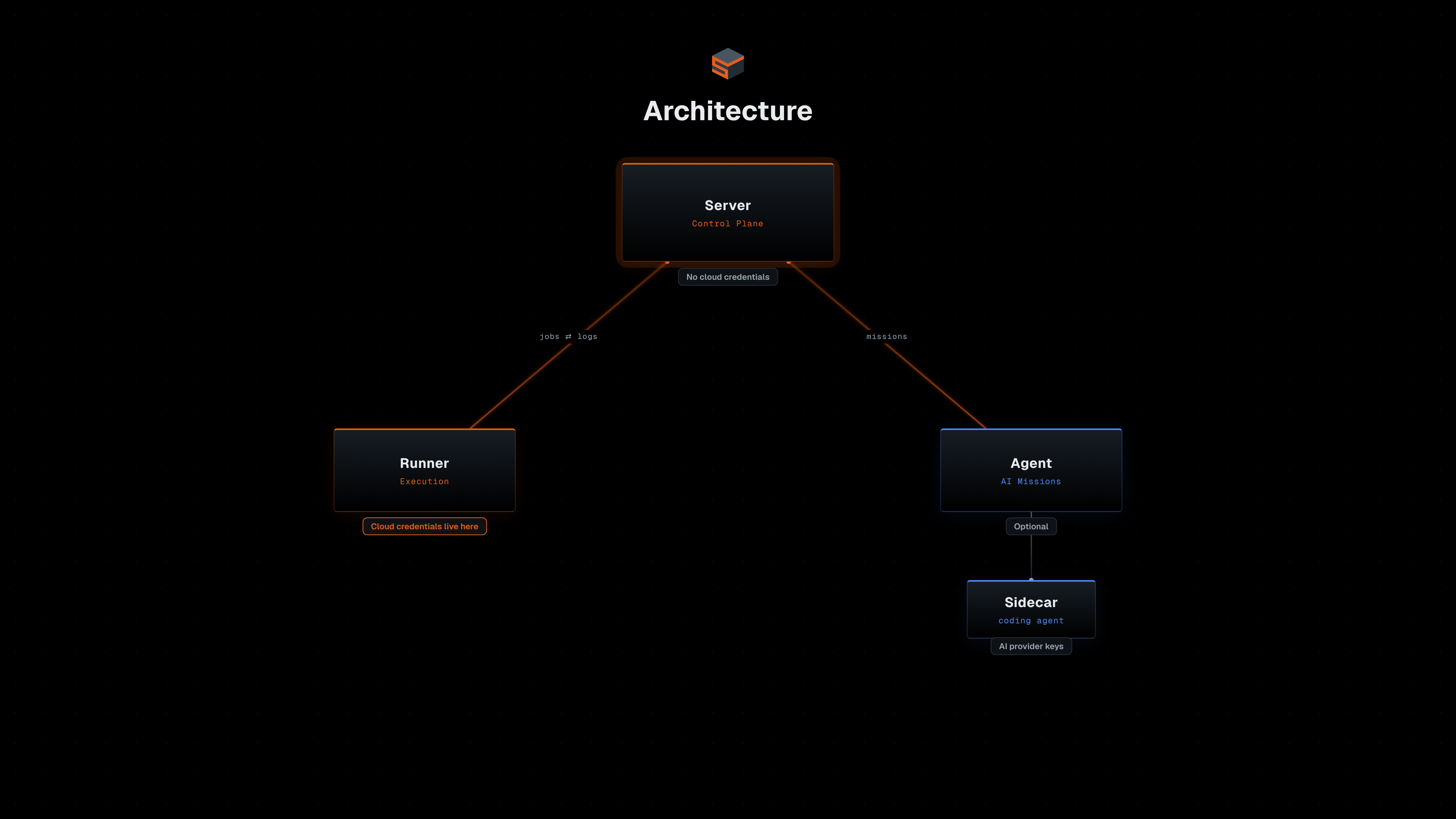
How it satisfies "What I wanted"
1. Modular deployments
Snap CD organizes infrastructure into three levels:
- A Module is a single Terraform/OpenTofu deployment. It points to code in a Git repo, has its own state file, and defines inputs and outputs.
- A Namespace groups related Modules. Think "networking", "storage", "applications". Typically only one team would be responsible for a single Namespace.
- A Stack is a hard boundary, such "prod", "dev" or "staging". Namespaces are organized into Stacks. Modules in different Stacks don't influence each other.
Almost everything in Snap CD can be managed via its own Terraform Provider. The examples throughout this article are all real Terraform resources from the provider. Everything you'll see here — creating Modules, wiring inputs from outputs, supplying Runners to Stacks, assigning roles, configuring Missions — is how you actually operate Snap CD day to day.
Below is some very simple sample code using iz to deploy a new Namespace into an existing Stack. Into the Namespace we deploy two Modules, "vpc" and "cluster", where the latter requires an output from the former as one of its inputs. For a more complete working example see here.
# Stack

data "snapcd_stack" "mystack" {
  name     = "my-stack"
}

# Namespace

resource "snapcd_namespace" "mynamespace" {
  name     = "my-namespace"
  stack_id = data.snapcd_stack.mystack.id
}

## Module 1 (VPC)

resource "snapcd_module" "vpc" {
  name                     = "vpc"
  namespace_id             = snapcd_namespace.mynamespace.id
  source_revision          = "main"
  source_url               = "https://github.com/snapcd-samples/mock-module-vpc.git"
  source_subdirectory      = ""
  runner_id                = data.snapcd_runner.my_runner.id
}

## Module 2 (Cluster)

resource "snapcd_module" "cluster" {
  name                     = "cluster"
  namespace_id             = snapcd_namespace.mynamespace.id
  source_revision          = "main"
  source_url               = "https://github.com/snapcd-samples/mock-module-kubernetes-cluster.git"
  source_subdirectory      = ""
  runner_id                = data.snapcd_runner.my_runner.id
}

resource "snapcd_module_input_from_output" "private_subnet_id" {
  input_kind       = "Param"
  module_id        = snapcd_module.cluster.id
  name             = "deploy_to_subnet_id" // The "cluster" module expects a variable called "deploy_to_subnet_id"
  output_module_id = snapcd_module.vpc.id
  output_name      = "private_subnet_id" // The "vpc" module produces an output called "private_subnet_id", which we map to "deploy_to_subnet_id"
}
NOTE that these are "mock" deployments, meant for illustration only. You can find their code here and here if you are interested.
The dependency graph is the core of Snap CD. Since the "cluster" Module has a snapcd_module_input_from_output that references an output from the "vpc" Module, Snap CD knows that a dependency exists. No scripts. No CI/CD glue. The dependency graph is derived from the configuration itself.
Module inputs can also come from Secrets. Secrets are created securely via the Dashboard (not in Terraform - the values never appear in state) and can be scoped to a Stack, Namespace, or Module. A Module can consume any Secret at its own level or from a parent:
data "snapcd_module_secret" "db_password" {
  name      = "db-password"
  module_id = snapcd_module.database.id
}

resource "snapcd_module_input_from_secret" "db_password" {
  input_kind = "Param"
  module_id  = snapcd_module.database.id
  name       = "admin_password"
  secret_id  = data.snapcd_module_secret.db_password.id
}
There are additional input types beyond outputs and secrets - static values, environment variables, backend configs, and more. The full list is documented at Module Inputs and Namespace Inputs.
2. Event-driven CD
Module deployments are orchestrated automatically based on multiple events:
- Source changes: A new commit lands on a branch, or a new semantic version tag appears. Snap CD detects this (typically via polling jobs pushed to a Runner, but manual notification webhooks are also supported) and triggers a deployment job.
- Upstream output changes: When a dependency's outputs change, downstream Modules re-deploy.
- Definition changes: When you modify a Module's configuration (e.g. via the Terraform Provider, or manually via the Portal), it triggers a sync.
You can also require manual approval before applies go through, with configurable approval thresholds. This lets you build workflows where plans run automatically but apply waits for human sign-off.
Let's consider again the code for the "cluster" Module above:
Source changes
That Module points to the "main" branch of the repo at "https://github.com/snapcd-samples/mock-module-kubernetes-cluster.git". Whenever new commits are pushed to this branch, Snap CD will automatically trigger a deployment.
Upstream output changes
Similarly if the "vpc" Module outputs a new value for private_subnet_id, then the "cluster" Module deployment will trigger.
Definition changes
Lastly, a change to the definition as follows would automatically trigger a deployment.
resource "snapcd_module" "vpc" {
  name                     = "vpc"
  namespace_id             = snapcd_namespace.mynamespace.id
  source_revision          = "main"
  - source_url               = "https://github.com/snapcd-samples/mock-module-vpc.git"
  + source_url               = "https://github.com/snapcd-samples/mock-module-another-vpc.git"
  source_subdirectory      = ""
  runner_id                = data.snapcd_runner.my_runner.id
}
Here we are changing the source_url but any changes to the snapcd_module itself or to any child resources such as snapcd_module_input..., snapcd_extra_file, snapcd_backend_config and so forth would also automatically trigger a deployment!
Publishing events externally
These deployment lifecycle events aren't limited to internal orchestration. Integrations let you push events to external systems. Slack is the first supported sink, with others to follow. The initial list of events center around jobs and their execution status, but these are likely to be expanded in the future. You define which events fire on which scope using Integration Events, and which scopes the Integration serves via the same supply model used by Runners:
data "snapcd_integration" "alerts" {
  name = "alerts"
}

resource "snapcd_integration_stack_supply" "prod" {
  integration_id = data.snapcd_integration.alerts.id
  stack_id       = snapcd_stack.production.id
}

resource "snapcd_stack_integration_event" "failed" {
  stack_id       = snapcd_stack.production.id
  integration_id = data.snapcd_integration.alerts.id
  trigger        = "JobFailed"
}
This sends a Slack notification whenever any Module in the production Stack has a failed deployment.
3. Runner isolation
Snap CD's architecture cleanly separates orchestration from execution. The Server is the control plane - it handles configuration, dependency tracking, job management, and log/output storage. It never touches your cloud infrastructure directly. No AWS credentials, no Azure service principals, no GCP service accounts.
Runners are self-hosted agents that you deploy in a manner and location of your choosing. They connect to the Server over an authenticated WebSocket, pick up jobs, execute standard terraform plan and terraform apply etc., and report back with logs and outputs.
You configure your Runners with whatever cloud credentials they need, and then you dictate which Snap CD Modules are allowed to use them via Runner Supply. Before a Module can submit Jobs to a Runner, a Supply must exist. Supplies can be scoped at four levels:
- Module-level - only a specific Module can use the Runner
- Namespace-level - all Modules within the Namespace can use the Runner
- Stack-level - all Modules within the Stack can use the Runner
- Organization-level - any Module can use the Runner (via
is_supplied_to_all_modules = true)
The most common pattern is supplying a Runner to a Stack - since Stacks typically represent environments (production, staging, dev), this gives you per-environment credential isolation. Every Module in the production Stack can only execute on the production Runner, regardless of what credentials exist elsewhere:
resource "snapcd_runner" "prod_azure" {
  name                          = "prod-azure"
  service_principal_id          = data.snapcd_service_principal.my_service_principal.id
  is_supplied_to_all_modules    = false
}

resource "snapcd_runner" "dev_azure" {
  name                          = "dev-azure"
  service_principal_id          = data.snapcd_service_principal.my_service_principal.id
  is_supplied_to_all_modules    = false
}

resource "snapcd_runner_stack_supply" "prod" {
  runner_id = snapcd_runner.prod_azure.id
  stack_id  = snapcd_stack.production.id
}

resource "snapcd_runner_stack_supply" "dev" {
  runner_id = snapcd_runner.dev_azure.id
  stack_id  = snapcd_stack.dev.id
}
Supply resources also work at the Namespace and Module level, so you can drill down when a team or a specific piece of infrastructure needs its own isolated Runner - for example, a data-platform Namespace where only a Runner with access to production databases should execute, or a single Module that manages a key vault with uniquely sensitive credentials.
The boundary is enforced by the Server before a job is dispatched - a Module without a matching Supply will not execute.
4. Permission system
Role-based access control is assignable at every level of the hierarchy: Organization, Stack, Namespace, Module. You can also set permissions for who can manage Runners, Agents and Integrations. Users, Service Principals, and Groups can all be scoped precisely. The permission model applies to every interaction path - whether you click "Approve" in the dashboard, call the REST API, or manage resources through the Terraform Provider. There is no unenforced path.
A few examples to show how this works in practice:
Platform team owns networking, reads everything else:
Reader at the Stack level (they can see everything in production), Owner on the networking Namespace (they can deploy, approve, and manage Modules within it). They cannot modify or deploy anything in other Namespaces.
resource "snapcd_stack_role_assignment" "platform_reader" {
  stack_id                = snapcd_stack.production.id
  principal_id            = snapcd_group.platform_team.id
  principal_discriminator = "Group"
  role_name               = "Reader"
}

resource "snapcd_namespace_role_assignment" "platform_owns_networking" {
  namespace_id            = snapcd_namespace.networking.id
  principal_id            = snapcd_group.platform_team.id
  principal_discriminator = "Group"
  role_name               = "Owner"
}
Junior engineer approves test but not prod:
They can trigger plans, approve, and deploy in test. In prod, they can see what's happening but can't change anything.
resource "snapcd_stack_role_assignment" "junior_test_contributor" {
  stack_id                = snapcd_stack.test.id
  principal_id            = snapcd_user.junior_engineer.id
  principal_discriminator = "User"
  role_name               = "Contributor"
}

resource "snapcd_stack_role_assignment" "junior_prod_reader" {
  stack_id                = snapcd_stack.prod.id
  principal_id            = snapcd_user.junior_engineer.id
  principal_discriminator = "User"
  role_name               = "Reader"
}
CI service principal scoped to a single Module:
The service principal can trigger plans and applies on the API gateway Module, but has no access to anything else. If the pipeline is compromised, the blast radius is limited to a single Module.
resource "snapcd_module_role_assignment" "ci_deploys_api" {
  module_id               = snapcd_module.api_gateway.id
  principal_id            = snapcd_service_principal.ci_pipeline.id
  principal_discriminator = "ServicePrincipal"
  role_name               = "Contributor"
}
5. Non-invasive orchestration
Snap CD supports multiple deployment Engines: OpenTofu (the default), Terraform (up to 1.5.5, the last MPL-licensed release), and Pulumi (currently in preview). You configure which Engine a Module or Namespace uses. The example below uses Terraform, but the same concepts apply to the others.
Most infrastructure CD tools ask you to change the way you write Terraform. Some require a wrapper CLI (toolname plan instead of terraform plan). Others impose a specific directory layout, parse plans through a proprietary format, manage state in a custom backend you can't easily leave, or layer a DSL on top that generates Terraform code. Each of these creates a dependency - the more a tool wraps Terraform, the harder it is to leave.
Snap CD takes the opposite approach. Your Terraform code doesn't know about Snap CD. There's no snapcd {} block, no metadata annotation. The orchestration configuration - which Runner to use, which inputs to provide, which outputs to wire - lives in Snap CD itself (managed via the Terraform Provider), not in your infrastructure code.
When a Module deploys, here's what actually happens on the Runner:
- Clone the source - the Runner clones your Git repo into a local working directory. Same code you'd check out on your laptop.
- Provide inputs through standard mechanisms - Snap CD writes
.tfvarsfiles for variables (values wired from other Modules' outputs or from static configuration),.envfiles for environment variables, and shell scripts (plan.sh,apply.sh) that wrap the commands with the correct flags. - Run standard commands -
terraform init, thenterraform plan, then (after approval)terraform apply. Real binaries, not a wrapper or shim. Logs stream back to the Server but the commands aren't intercepted or altered. - Collect outputs - after a successful apply,
terraform output -jsonreports results back to the Server for downstream dependency wiring.
This means you can always drop to the shell. SSH into a Runner, navigate to the Module's working directory, inspect the files Snap CD prepared, and run terraform plan yourself. Useful for debugging, for one-off operations like terraform import or terraform state mv, and for building confidence that nothing magical is happening. Upgrading your Engine is just updating the binary on your Runner - there's no intermediary that needs to understand the new plan format. And if you decide Snap CD isn't the right fit, your code doesn't need to change. Your state files are where they've always been.
Snap CD also offers ancillary configurations that allow you to:
- customize how the standard
terraformcalls are configured, via Engine Flags - inject custom before/after scripts via Hooks
- supplement module code with Extra Files
6. Supporting Ecosystem
Beyond the Snap CD repo, there are several supporting projects:
- Deployment repos - ready-made setups for Docker Compose and Kubernetes
- Terraform Provider - all Snap CD resources can be configured via its own Terraform provider. Source on GitHub, published on the Terraform Registry
- Sample deployment - a complete working example that sets up a Stack, Namespace, Modules with dependencies, and a Runner
- Documentation - source on GitHub, hosted at docs.snapcd.io, including a quickstart guide that walks through a complete setup end to end
- Demonolith - a companion CLI that handles the mechanics (both refactoring and state migration) of splitting monolithic terraform projects into smaller modules
7. AI on a leash
AI agents can diagnose a failed terraform apply, summarise what changed across a dozen Modules overnight, draft a fix for a misconfigured security group, and recommend whether a plan is safe to approve. The potential to eliminate toil is real. But so is the potential to break things - the gap between "run this command" and "destroy this resource" is one flag.
Most AI agent frameworks assume broad access: give the agent credentials and let it figure things out. The mitigations are crude - read-only API keys (diagnostics but no automation), wrapper scripts with allow-lists (fragile), or separate CI pipelines that add latency and cut the agent out of the approval loop entirely. None of these give you a spectrum of trust.
Snap CD's Agent component brings AI into the deployment lifecycle - but reactively, scoped to specific events, not as an autonomous actor with broad access.
Agents respond to Job events via Missions. Each Mission type is bound to a specific trigger:
| Mission | Trigger | What it does |
|---|---|---|
AutoDiagnose |
Job fails | Posts a root-cause hypothesis with relevant log excerpts and suggested next steps |
AutoFix |
Job fails | Attempts an automated fix based on the diagnosis, then retries the Job |
ApprovalRecommend |
Job reaches approval-required state | Analyzes the plan output and recommends whether to approve |
SummarizeJob |
Job succeeds | Generates a human-readable summary of what changed |
An Agent is a resource backed by a service principal - exactly like a Runner. You create the Agent, assign it a Service Principal (which determines what it can do via RBAC), and supply it to the scopes it should serve (same supply model as Runners). Then you declare which Missions should fire at which scope:
resource "snapcd_agent" "ai" {
  name                       = "ai-agent"
  service_principal_id       = data.snapcd_service_principal.ai_agent.id
  is_supplied_to_all_modules = false
}

resource "snapcd_agent_stack_supply" "test" {
  agent_id = snapcd_agent.ai.id
  stack_id = snapcd_stack.test.id
}

resource "snapcd_stack_mission" "diagnose_test" {
  stack_id     = snapcd_stack.test.id
  agent_id     = snapcd_agent.ai.id
  mission_type = "AutoDiagnose"
}
This sets up an Agent that auto-diagnoses any failed Job in the test Stack. Without a supply covering prod, the Agent won't receive Missions there - even if someone accidentally creates a prod-scoped Mission for it. You can scope Missions down to individual Namespaces or Modules, and the Agent's service principal still needs the appropriate RBAC role to perform the action (e.g. Contributor to attempt an auto-fix, Reader to diagnose).
The Agent itself doesn't perform AI work directly - it supervises Sidecar subprocesses (such as the bundled claude-sidecar for Anthropic's Claude) and routes each Mission to the appropriate Sidecar. Every action is logged and attributed to the Agent's service principal, giving you the same audit trail you get for human operators.
If you prefer not to use the Missions framework and instead want your own AI agent to interact with Snap CD's REST API directly, there are two approaches:
1. Plain Service Principal - register a Service Principal, assign it the appropriate roles, and have your agent authenticate with the Client ID / Client Secret pair via the standard OAuth token endpoint:
POST /connect/token
Content-Type: application/x-www-form-urlencoded

grant_type=client_credentials&client_id=<org_id>:<client_id>&client_secret=<client_secret>
The
org_idis the Organization GUID. For self-hosted deployments using the default configuration, this is10000000-0000-0000-0000-000000000000.
The returned bearer token is then attached to subsequent API requests as an Authorization: Bearer <token> header, letting your agent call any endpoint its roles permit - trigger plans, read job logs, post approvals, etc.
2. Service Principal with Agent identity - if you want Snap CD to recognize that API calls are coming from a specific Agent (for audit trail purposes), attach the Service Principal to an Agent via the snapcd_agent resource and pass the agent_id parameter when requesting the token:
POST /connect/token
Content-Type: application/x-www-form-urlencoded

grant_type=client_credentials&client_id=<org_id>:<client_id>&client_secret=<client_secret>&agent_id=<agent_guid>
The returned token carries an agent_id claim. Snap CD uses this to attribute API calls to the named Agent in the audit log, making it clear which actions were taken by AI versus humans or other service accounts.
Getting started
The entire project is source-available on GitHub. The community edition includes all core functionality, with limits high enough for solo developers and small teams. Deployment options: Docker Compose or Kubernetes.
A cloud-hosted edition is also available at snapcd.io.
If you would like to try it out, here is a quickstart guide.

Intelligent GitOps for Infrastructure as Code. Automate, orchestrate, and scale your infrastructure deployments with confidence.
© 2026 Snap CD. All rights reserved.